Jack Compatibility
Jack Input Ports
Sonic Eddy uses wireplumber for the routing, and because wireplumber does not touch nodes connecting with the Jack api at all, cannot directly route Jack nodes. It provides the jack input ports to circumvent this issue.
A jack input port stores the name of a jack node, and output ports, two for stereo, one for mono. When Sonic Eddy sees a jack input port, it create a loopback module, where the capture port connects to the jack output ports, and the playback node can be used by Sonic Eddy channels.
Sonic Eddy will constantly check if a Jack input port exists, and automatically connect the jack node and the capture node of the loopback module.
User Interface
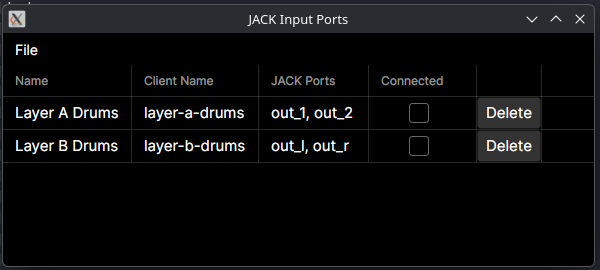
The jack inputs tool is available in the menu under Audio -> JACK Input Ports.
It presents a list of all configured jack inputs when it opens. Each input is
shown in a list, displaying its name, the name of the jack client, the ports to
connects to, and the current connection status. There's also a delete button
allowing the deletion of jack inputs.
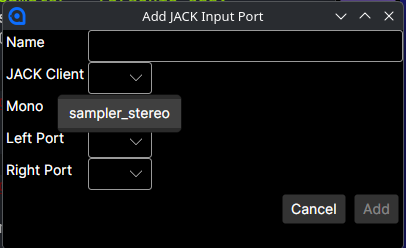
New jack inputs can be created from the jack inputs tool menu under
File -> New. The dialog presents inputs for the name of the virtual jack port,
which is used to name the loopback modules nodes, the name of the jack client, a
flag determining if the jack module uses mono or stereo ports, and the ports.
The jack client name, as well as the ports are selected using combo boxes, filled with currently running jack nodes and ports.
Jack inputs are persistent and will be restored after an application restart.